Update: Thematic 2.0 is now in beta and available on Github, which makes this theme outdated. You can still use it since Thematic is backwards compatible, but if you want to be up to date, use Thematic 2.0 from Github and Responsive Base Plus.
Responsive Base is a child theme built on the mobile-first approach to responsive web design. It was created not to just be responsive, but to act as a template or starting point for child theme development for the Thematic Theme Framework.
After creating quite a few Thematic based sites, I felt I needed a solid base starting point which saves a little time by being already set up with some very useful modifications I frequently use.
Responsive Base is ideal for me, I created it for me. Although others working with responsive themes for Thematic will find it useful and refreshing. It is intended to work best with the latest version of Thematic, but works fine on 9.7.7 and above.
Download Responsive Base Theme
View the demo to take a peek, or visit GitHub to download or view the code. Special thanks to Kathy for inspiration from her adaptive layouts for Thematic.
Responsive Base Highlights
The CSS
Thematic has a great minimalistic style by default, but I prefer not to have those default styles at the start of every child theme.
- The reset.css has been replaced by normalize.css which preserves the browser defaults and also corrects common browser inconsistencies.
- Original style sheets have had a ton of the unnecessary styles removed and condensed, while also building everything with a mobile first approach to responsive web design.
- Added HTML5Boilerplate print styles for clean printing and HTML5Boilerplate helper classes to take advantage of the latest best practices for things like clear fixes and image replacement.
The Functions PHP
- Adds my snippet to add conditional classes for Thematic to the header to target old versions of IE. This also now adds the
meta viewportfor correct scaling on mobile devices. By default this responsive theme will display a static mobile version with a little CSS for IE7 and IE8 based on a post by Joni Korpi called leaving old IE behind. - Includes a few functions to clean up the
headof the document of lines of code that are loaded by default. - Helps optimize script loading in WordPress by providing a template to promote good habits. Combining scripts, loading custom scripts in a custom.js file instead of on page and loading scripts in the footer unless they are required to load in the header.
- Loads Modernizr which includes the html5shiv for getting IE to recognize new HTML5 elements, also Modernizr does a ton more, especially useful for providing CSS3 fallbacks. Responsive Base child theme comes bundled with the full version of Modernizr, you should however use the build script to only include what you need.
- Loads FitVids JavaScript which handles the resizing of videos for responsive websites.
- Also provides a bunch of handy functions I tend to use on most child theme builds. Such as PHP snippets to add a Favicon, register additional menus in WordPress, a fourth subsidiary widget (good for footer menus), optimized Google Analytics and also a snippet to hide widget locations in the admin area.
Responsive Base File Structure
Includes necessary folders and files already setup in the child theme to promote well structured themes.
- /images/
- /js/
- custom.js
- jquery.fitvids.js
- modernizr.js
- favicon.ico
- functions.php
- screenshot.png
- style.css
- style.scss (for Sass/Compass)
Last Thoughts
While this theme is intended for developers to dive right in to responsive design with Thematic, it would also help people who are new to child themes get an idea on how things can be done in a clean and efficient way. Getting started in mobile-first responsive design can be rough at first, so hopefully you find this child theme template useful and be sure to always get the latest version or fork your own from GitHub.
Feel free to post your creations with the Responsive Base child theme in the comments, or if you think of anything to add, shoot me a pull request on GitHub. :)
Update: Now made to comply to with Idiomatic-CSS guidelines and also added a style.scss file for a basic Sass structure which also follows the guidelines. If you don’t use Sass, delete the style.scss file.
Update: Now works with the Thematic HTML5 Plugin by Karin at invistruct.com.
64 replies on “Responsive Base, a child theme for Thematic”
Scott, I’ve been using Thematic for a while and was curious if I should start developing my site using this as a starting point or wait to see what the changes bring over at the Themeshaper forums. I’ll have a play around with this locally but a lot of code just goes over my head.
I would definitely start playing with it locally, if anything it is a good way to pick up a couple tips and best practices to optimize your current theme. You should only start a redesign with a base like this if you are interested in learning responsive web design.
Most code is commented or has a corresponding link if you need more information, the only hard part will be handling the CSS involved with responsive web design, it can be tough to grasp at first if you have only worked with fixed width sites. There is definitely no shortage of information on how to handle things though, especially since responsive design is all the rage.
As far as waiting for a newer Thematic, the next version to be released is just bug fixes on the 9.7.7 version, there isn’t anything new and exciting being introduced. A new version hasn’t been released in about a year, for a modern HTML5/Responsive version of Thematic could be a ways a way.
I love your child theme and am getting familiar with it. I was testing on IE 7 & 8 even though I know responsive design may have hiccups in old IE versions. It seems the primary aside gets pushed below the content and the access floats up vertically. IE 9 looks good so I’m just trying to figure IE 7 & 8 work a rounds. Right now I have a function that is linking to a blank IE style sheet for versions below IE 9 just can’t seem to figure out what to change. A fixed width option would be fine for my purposes.
Any suggestions would be appreciated.
Thanks…Great job on the theme I’m a huge thematic fan.
Using respond.js and a separate style sheet for IE versions below 9 I figured it out. Again, great theme!
Sorry about the delay, was out of town. Good choice on using respond.js to provide compatibility for old versions of IE’s below version 9.
By default the Responsive Base child theme uses a technique of just serving a static version as you would see on mobile devices, you can read more about it here.
So instead of adding another script to the the child theme, I opted to keep it light and simple by not providing a responsive layout for those older browsers, they get the mobile version. :)
Just a tip, with the conditional classes in the child theme, you won’t need a separate style sheet. You can target the IE versions through CSS classes all in the same stylesheet which cuts a http request.
Glad you got it working and if you use it on a project, feel free to post a link.
I’ll give your Responsive Base a good go and see what I can learn along the way – I’ve already stripped out and used half of your functions and included them in a Thematic ChildTheme. I’ve been playing with jQuery Masonry and that’s part of my logic in moving away from fixed widths in my site.
http://www.drecart.com/ Have a play Scott. Bit of your code, Helga’s code etc etc – it’s responsive.
Awesome, that must have been a bit of a challenge merging it to keep the same look and style. Looks like you have a few minor things to still work through, like making the contact form flexible and that damn hardcoded “size=” in the input on the search bar so it can flex. I will fix that search bar box resize function to the actual theme and make a ContactForm7 snippet (I already have both) shortly for others as it looks like something that would be useful. :)
Thanks for using it, I will try to keep detailed info on GitHub so any changes or modifications I do can be easily added in.
BTW, your pictures are awesome.
What did you use to get the custom fonts? I used to use s Google font plugin, but it stopped working for me.
Just judging by the way it is loading, it looks like drecart.com is loading the fonts manually (no plugin), which is just the simple process of adding the @import to your style.css file in your child theme.
Any luck getting masonry working, especially with gallery code?
Hi Scott,
I have been looking at your theme. First of all, thanks for the effort in making a responsive theme.
I want to change the theme layout. How do I do that? If I include the scripts in Thematic’s layout folder, they don’t work. If I want to move the sidebars to the left, what has to be changed?
Thanks.
By default the site has a very minimal layout with a sidebar on the right, this is just an example using media queries. If you wanted to change that, it is all CSS styling.
@media only screen and (min-width: 768px) {

#container { float:right; margin-left:3.8%; }

.main-aside { float:left; clear:left; }

}
If you just change some floats and margins, the sidebar is on the left. Typically if you asking questions about how to move the sidebar in CSS, you probably will have a ton of trouble working with this theme. It is really intended for people who already have a grasp on CSS/HTML/PHP.
As far as the including scripts in the layout folder, I am not sure what that means.
Hi Scott, firstly thanks for the responsive theme based on thematic. Is there any way to allow IE8 and IE7 to support the responsive sizing, as opposed to the default mobile version? How would I go about doing that?
I will see if i can complete a more thought out reply since I have had this question emailed to me a few times also. The gist of it is to use Respond.js, which is a polyfill for IE 6-8 AND remove the “internet explorer specific” section from the stylesheet, which are what give it the tiny width.
If you are wondering how to load a script like Respond.js, just look at how the other scripts like custom.js are handled in the functions.php scripts manager section, which would be a perfect template.
i have question
Im planning to sell wordpress theme
can i use this responsive framework to sell in my template store
You can do whatever you want with it. :)
Hey Scott,
Been playing around with this, using Codekit and Coda 2 on the mac. I’m curious, have you used Compass with your SASS coding? I saw the normalize.css code in the beginning of the style sheet, and it made me a little nervous to add the Compass support in… and I’m not even really sure what Compass does yet or if I need it. Anyway, just curious if you bothered with it?
Normalize.css just replaces Thematic’s default CSS reset, Normalize makes things consistent and preserves a bunch of defaults.
Compass however is bad ass, use it! Compass gives SASS a bunch more features and is especially useful for CSS3, for example.
The SCSS
a { @include transition-duration(.3s); @include transition-timing-function(ease-in-out); }Outputs in CSS
a { -moz-transition-duration: 0.3s; -webkit-transition-duration: 0.3s; -o-transition-duration: 0.3s; transition-duration: 0.3s; -moz-transition-timing-function: ease-in-out; -webkit-transition-timing-function: ease-in-out; -o-transition-timing-function: ease-in-out; transition-timing-function: ease-in-out; }That would just be one tiny example of something useful with Compass, it is very powerful and I highly recommend using both SASS and Compass
Scott —
I loaded Responsive Base with Thematic 1.0.3.2 but it doesn’t even appear to look like your demo, meaning it still looks like the normal Thematic default. What am I missing? I didn’t notice any instructions regarding doing anything other than setting it as a child to thematic.
If you are seeing the default Thematic then something just isn’t set up correctly. Child themes are super simple though and it probably is one of two things. The child theme needs to be uploaded/installed in the theme folder /wp-content/themes/ folder (not inside Thematic). Also once installed, you need to go into your WP Admin, Appearance > Themes, then select select Responsive Base as the theme. It should work fine if you have the above done correctly, you probably already figured it out since it took me a few hours to reply. :)
Hey Scott, it appeared to be Chrome’s fun idea to cache the blank child theme I’d started with. It’s worked after a few refreshes when I came back to it. I’m curious about a few things in using Responsive Base. Normally, I split out style sheets in to a number of common ones for the sake of tidy structure and import them into the main style.css of our child themes. The only thing in the child theme’s style.css are imports of the other stylesheets and @font-face. Is your philosophy regarding how to use RB, that I should directly edit RB’s style.css? Should I break the sections up as I might normally do? Since the core styles are doing two key things – overriding Thematic’s CSS and creating the core responsiveness, I’m not quite sure of the best strategy to dive in. I don’t want to break the responsive set up nor do I want to try to override child styles with others. This experiment is really the first look at responsive design for me, so I am not yet familiar with how the layout responsiveness is created. If I want the sidebar on the left, for example. Do I need to paste in one of Kathy’s Adaptive stylesheets or do I use Thematic’s? I’m coming into this as from as a designer who’s CSS savvy and can write some marginal PHP rather than as a developer, which I’m surely not. So, I’m looking to get some bearing on how to procede efficiently without causing my developer partner massive headaches in file structure changes.
Yes, you should edit the stylesheet.css directly. As far as using @imports in the actual stylesheet is frowned upon in production sites and is not considered best practice. The one way to get around this (and I use it) is to use @imports in the style.scss (SASS) file where on output the the SASS preprocessor will combine the @imports into one style.css. I didn’t include @imports on Responsive Base because I was weary of making it too complicated for beginners to grasp.
As far as changing the sidebar, this is simple CSS, just modify 3 float properties and move the margin-right to margin-left and you are done. This is all done in the media query portion of the styles.
Thanks Scott. I’ve gotten real familiar with Thematic over the last year and a half or so, to the point of having a pretty set pattern putting sites together. The responsive design avalanche coming down the hill throws a wrench into things and I’m just finding the time to start getting educated. I don’t know anything about sass yet, except I recall reading that it’s like CSS with some logic capability. I’ll have to check that out too. But, the reason I came looking at RB was to jump start the ability to offer responsive design ahead of client desire becoming a problem for us AND to continue leveraging what we know about using Thematic. So it’s time to dive in. I truly appreciate your input and all of your hard work for the masses.
SASS, Less and Compass seem a bit daunting. Can I edit the style sheets as normal, and preprocessor takes care of the rest?
Derek–I took about two hours to try out SCSS, and I am hard-pressed to ever go back. OMFG, so good, and totally worth the invested hours to learn.
I too have considered Bones, haven’t looked at Roots, and still using Thematic thanks to years of using it, and Scott’s responsive adaptations.
Hey Scott, I lost some changes/styles and I think it has to do with Thematic updating. I ended up with a 500 error. Basically the Home Page would show the RSS icon normally and than the 5 query posts as full images. So my site is down and I’m thinking, should I learn Less or SASS? Suggestions?
That is odd things broke, was it throwing an error if you turn on WP Debug, they changed the way the post classes are and it broke one of my sites where I had a static page, but that was easy to fix by using WP’s default for calling post classes.
Also, SASS is very easy to learn since technically CSS will pass for SASS and really it boils down to how far you want to push it. There are tons of video tutorials on SASS out there, while it would be good to learn as it is the future of CSS (imo), if you aren’t developing continuously, then it may not be necessary to bother with it. Personally, I love it. ;)
Hi Scott,
I’m using your Responsive Base for my new blog: byfilipinowriters.com so I drop by to say: Thank You! I did very minimal changes to your theme’s css file (I added the @font-face) and functions (added the code for header widget and menu attribute). The customizations I made, I entered them in the WP: Dashboard -> Appearance -> Edit CSS. Cool coz I don’t need to changes the default on your theme’s css. :) I’ll use Responsive Base for my other personal blog.
Nice, interesting color scheme. :)
Looks like you are still working on it, I will check back every now and then to check the progress.
Just a quick question here: how can I activate the dropdown menus on non-mobile devices?
Well, you can’t.
The short story is the current script Thematic uses doesn’t work with responsive web design so an alternative solution must be built in.
The long story is Responsive Menus are complicated, there are so many different ways to do things that inserting a dropdown menu in Responsive Base would almost be a disservice to someone as it would only be one of many solutions. I have been pelted with questions and emails about dropdown menus and I am in the process of creating one for my Child’s Play theme since it is more intended to be finished theme, where in Responsive Base I tried to do the less is more approach to keep things simple. When I finish this (most likely today), I will start working up a quick way to bolt the menu up to Responsive Base for questions like this. But for now, there are many menus out there, you have to build it. The best resource I could point you to would be Brad Frost’s Codepen, where a bunch of responsive menus reside in a minimal format which is perfect for working into this theme, he has a bunch. :)
Makes sense to me. I appreciate the quick reply!
I’m just starting to dive into this theme, and it’s pretty exciting so far. Thank you!
I took some time and implemented a solution using suckerfish (or superfish? wtf is it called? Whatever it is that Thematic comes with), and Child’s Play, essentially following someone’s instructions on GitHub that I thought was posted here, and… now can’t find. And unfortunately the site is still in dev, so I can’t post it just yet. So why I’m even responding here I don’t know. To frustrate everyone maybe? :P
So… about that other version posted on Github. There is a bug in it, the mobile menu (small scale) still has drop down functionality enabled.
While it may look fine on a desktop version, you are using the mouse to hover over those elements, so without a mouse, those dropdowns won’t be visible (or accessible).
Example Images: http://www.diigo.com/item/image/3estx/mnk5 and http://www.diigo.com/item/image/3estx/b8g6 show how you need to hover over it to get it to show up, no hover on mobile devices. :(
As mentioned above, I am 90% done with the solution to this, although….. I may drop it and use one of Brad Frost’s patterns because the way I have it currently is like the most simple functionality. So I may step it up, but for now I should have it pushed up to Github shortly. :)
Yep I ran into that bug, and then fixed it by implementing buttons into the sub menu top level links. So any menu that has a sub menu gets a button assigned to it. That way if you roll a mouse over it, it expands. If you don’t have a mouse, you have a button to tap to expand.
Probably going to wind up being the exact same solution you’ve worked out. :)
Lol, dang… I haven’t even got that far. I was going to avoid that by showing all the links and have submenus indented. Currently I am working on flyout indicator arrows since I figured that was going to come up. Well…. If worse comes to worst I can steal your solution for the buttons. :P
I so hate working on menus (well ones with dropdowns), they can be done so many different ways.
Since you hate working on menus…… Could you point me in the right direction on how to strip out a big chunk of thematic and replace so I can have the Bootstrap style of menu? Been digging through the extensions and even considered jumpig over to Bones/Roots but that’s a new learning curve after a couple of years playing around with thematic.
I have tried Sass and have Compass installed but yet to get past my thematic code to style.
Hi Scott,
Great work with this theme. Responsive is definitely the way things are heading, but I’m yet to find another option that gives you this much scope to customise and ‘make the theme your own’.
I was wondering, is there a way of giving the theme breaking points, so that, instead of scaling all the way up to its full width, it ‘snaps’ between layouts?
Also, how would I go about changing the maximum width that the site stretches to?
Thanks again,
Alex
As far as giving the layout specific breakpoints, this is very easy and is done with the media queries, you just need to add more of them and change the max widths.
@media only screen and (min-width: 45em) {#branding,
#access .menu,
#main,
#subsidiary,
#siteinfo {
max-width: 1140px;
}
.....
}
What may be confusing here is the “min-width: 45em” part of the media query, I used EM measurement instead of PX because there is some edge case usability thing with scaling that pop up and cooler people than myself use it. You can change that to pixel values to make things a little easier to work with (ie. “min-width: 700px”).
When you talk about specific breakpoints, it sounds like you want to be using an “Adaptive” approach which is often confused as responsive design. Adaptive is actually easier to code, but isn’t recommended since you can’t set breakpoints for every device so you end up catering to popular sizes and if someone has a a 760px device and you end up serving them the layout for a 480px device so there is some extra space on the sides, which isn’t a huge deal. However, with a fluid responsive site the user sees a site which will always fill up the screen size of any device.
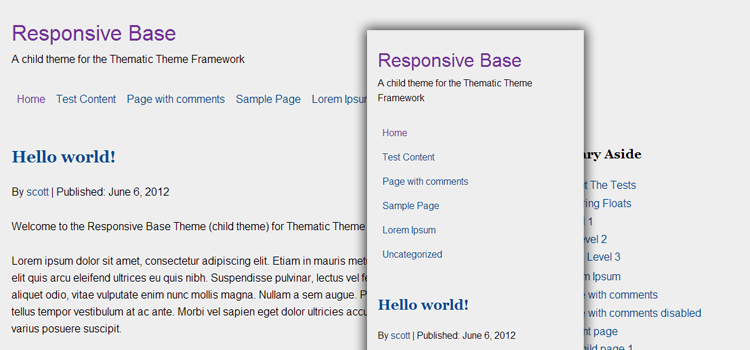
Now, that may be confusing, here is an image which shows that when the browser is scaled down to a certain width the site jumps to the mobile view, all that extra space on the sides is then wasted. Adaptive design is often called responsive design, which is one of my pet peeves and it is very confusing because adaptive is easier, but responsive is better. In the end it is all personal preference.
So to add specific breakpoints, really you need to just change the media query break points and set the maximum widths, both in the CSS. Technically you could just set a max width on the
#wrapper, but in responsive base I opted to do max widths on the internal elements to make it easier for people who want to extend things, like background colors and images so they are full widths (which is most common on sites I build).The above is probably confusing, but just change the EM to PX in the media queries and play around with the max widths and you will get it quickly, also if you want the layout to be more adaptive you may need to add another media query completely, so you end up using a few which is totally normal. If that fails, feel free to let me know if you need help with something. ;)
Thanks for your reply. The main reason I wanted to do this was so that the images don’t do all sorts of strange things as the site reorganises itself as it scales. I figured that, if the overall site had a narrower max-width, most people who look at the site on computer screens will see the same thing, and I will have more control over how the images sit within posts.
Is there a way you can think of that I could have images go from being left-aligned or justified to being full-width when the site scales to its smallest (mobile) size?
Thanks for your help. Very thorough!
Actually, ignore that last one – it works already! Thanks!
Hi Scott. Thanks for posting. What are you using to achieve the three responsive columns on your about page?
On the About page I use a custom version of a columns shortcode plugin I created that I never got around to posting the responsive version, like so many other things I create.
There is however a plugin that is built better than what I created, it is actually really good and I would highly recommend it. It is called Grid Columns and is by Justin Tadlock. For something like shortcodes you want to use a plugin, that way they stay theme independent.
Sorry if this is a silly question, but I am relatively new to Thematic (and child themes). I’ve played around and built my own Thematic based child theme. But now, if I want to use Responsive Base, should I create a child theme that uses Responsive base as it’s template? Or can I safely just start modifying Responsive Base leaving Thematic set as the template? Just wondering what happens to my site if you make development change to Responsive Base. Hope this makes sense! Thank you.
You are going to want to use Responsive Base as a starting point and develop on top of it. While you will not be able update, there really isn’t anything complex about it that will need major changes to warrant an update. I tried to make it as simple as possible so people don’t have to work through stripping Thematic down, I know I got tired of it.
I have probably built around 15 sites on it so far and by doing that I have worked out most of the minor kinks, mostly all CSS. In fact this layout you are looking at now is one I just put up today, built from Responsive Base and I reworked everything to be extremely SASS/Compass heavy with use of Susy Grids (my current workflow).
Just use it as a head start starting point and make it your own. Eventually you will probably end up with your own version that is set up best for your workflow. Then anytime you think of anything to add/subtract, just modify your custom version of Responsive Base. :)
Great. Thanks for clarifying. I’m nervous, but I’m diving in…
Hi,
I just ran a couple of WordPress updates (I think it was Jetpack and Akismet), and now none of my custom CSS seems to be working. Any thoughts?
I emailed Alex back, this issue turned out to be the plugin WP JetPack Custom CSS featured got turned off, this is where the theme modifications were. Enabling the Custom CSS module brought the styling back, just to add info, JetPack saves this Custom CSS in the database, so it really isn’t ever lost which is just good to know. :)
Thanks Scott – an awesome theme AND great support!
Hi Scott,
Thanks for the awesome theme. I have what is probably a really dumb question, but I don’t seem to be able to find the answer to it. I’m trying to get the wp dropdown menu’s to work. I’ve tried commenting out the lines that remove superfish, and more and don’t know how to get them back? I’m using a nice script for responsive menu for smaller screens, but really would like to just have plain old dropdowns for normal sized screens.
This is the site I’m working on:
http://shaktidances.com
I’m new to Thematic, having abandoned Thesis recently and making my way through it – although I’m not really a programmer, I can usually manage to hack my way through things most of the time.
Thanks again – I really appreciate people like you that make life easier for the rest of us!!
I see you got it working, sorry about the delay. I had thought about this when you mentioned it and the way you did it works fine, except in IE8 and below. It won’t recognize code inside the media queries. Technically you could target the classes provided by modernizer and duplicate the menu (or add the .lt-ie9 class to your existing sf-menu section). Or, add an additional JS script like Respond.js which would also work, but if you do that you can drop all the IE specific classes that the child theme like the max width, they wouldn’t be needed.
Hey Scott,
I’m trying to implement your amazing child theme! Did you get any solution for the responsive dropdown menu? Any advice?
Thanks!
You already may have seen it, but I wrote up a post on adding Bootstrap 3’s Menu to one of my child themes.
Hi Scott,
I was wondering if you can tell me what I am doing wrong here, as this is my first responsive site (http://ontsog.com/) using the RB child theme. But I just can’t seem to make the blog title and menu scale down or clear each other so it’s not such a mess. Also, how would I make the #main content area fill more of the responsive area as there’s lots of space around it.
Thanks in advance,
Simon
There is a tiny issue.
You changed the media query width to
@media only screen and (min-width: 320px) {which is pretty dang small, so it may be a little confusing. By default, everything not in the media query will apply to everything, mobile through desktop. Then the original media query before it was changed would say at 45em (pretend this is 800px), do this, which gives it the desktop layout. You have changed that desktop layout to 320px, which is kind of like saying “more mobiles styles” since 320px is so small. Not sure why that was done, but if you remove the 50% width and floats from the mobile section (outside the media queries), and add them into a new media query with 45 em (800px), you then want to add that 50% width inside there. You can change the value to whatever you want, when it comes to media queries, just go with what size looks good.Thanks Scott, my main concern is getting the blog title and navigation to shrink or sit better than it is right now. Any suggestions how I can do this as if I put anything in the media query it effects the whole site not just on mobile devices?
Hi Scott,
Haven’t posted for a while, but I’m just trying to re-build my site using Responsive Base, and I’m having a bit of trouble with my header and primary menu.
A couple of questions:
1. Is there a simple way to set the menu to be centred underneath the branding?
2. I have an animated GIF as my header image, but it (obviously) appears a bit fuzzy on devices with high-res screens. Can you recommend a way to use a retina-ready version of the image?
Thanks again!
For the first question about centering the menu, check this post http://thematictheme.com/forums/topic/centering-the-menu/ it is a little weird, but works fine.
The second question is a little tougher, I haven’t actually dealt with anything like that…. I don’t know enough about SVG to know if you could replicate it, I would think it is possible but probably a pretty steep learning curve, I definitely haven’t been looking forward to tinkering with it yet. Check into http://dmitrybaranovskiy.github.io/raphael/ and http://snapsvg.io/
Also, this http://simurai.com/blog/2012/12/03/step-animation/ but it is PNG, so it wouldn’t be high-res awesomeness, but probably sharper than a gif. You may even want to ask a question on somewhere like CSStricks.com to get some more insight, I just don’t have much experience with that kind of stuff and haven’t ran across anything else I can think of. ;P
Hey Scott, thanks for the advice! I tried the centering the menu trick and unfortunately it stuffs up the responsive view on the iPhone (must be something to do with the right margin/padding – it has a white gap running down the side). Also, it doesn’t work with nested menus. Not to worry! Thanks anyway.
Hi Scott! Thanks for all your work on this theme. I recently implemented it for the first time, but am having the issue where on IE8 it flashes the mobile version of the site for a second before the media query is applied so that the regular “desktop” view is seen. At first I thought perhaps the reason was that respond.min.js was being loaded in the footer, and I read somewhere that it’s best to load it directly after the style sheet is loaded. I changed the relevant setting in functions.php so that it now loads in the header, just below the style sheet, but that didn’t solve the issue — still flashes the mobile version on IE8. Any suggestions? I should add that I downloaded the Thematic theme in July of 2013, so if there have been relevant enhancements since then, perhaps that’s the issue… Thanks so much in advance for your help!
I would have to see a live version of the site to be sure, but my best guess would be the “Internet Explorer Specific” part of the stylesheet.
.lt-ie9  {

    #branding,

    #access .menu,

    #main,

    #subsidiary,

    #siteinfo {

        width: 640px;

        margin: 0 auto;

        padding-left: 20px;

        padding-right: 20px;

    }

}
Just delete that and it should be fine. The above is Sass, but find the CSS equivalent and delete that if you aren’t using Sass.
The only thing that CSS is doing is providing a narrow container to constrain the layout from going 100% width on desktops, it is a cheap fix for old IE’s that don’t support media queries. Using respond.js makes this totally obsolete though. :)
If you already did that… I would have to see a live version or run the child theme locally to find the issue.
Scott: Thank you so much for the quick response and the recommendation. The lines of CSS you noted were already commented out. If it’s not too much trouble, I’d love to send you a link to a live version of the site. The site isn’t for the public, so is there a way I can privately send you the URL?